
Revised: 11/26/2012
Using FS mode in a template creates a way to group general ledger account numbers that cannot be easily grouped by the account number itself.
In the GL Account Master there are 5 FS Groups
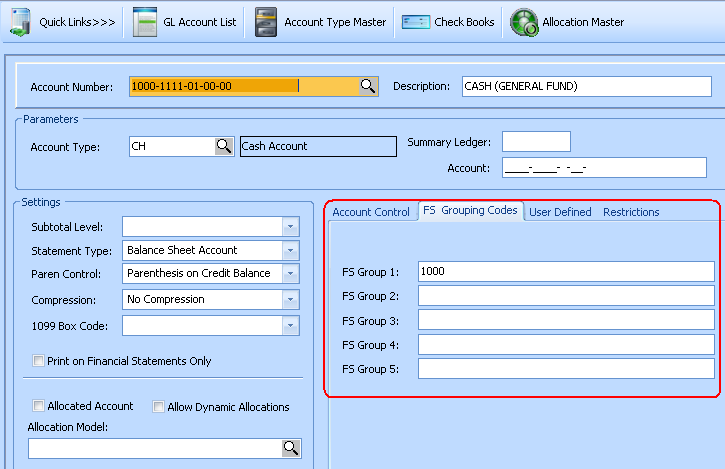
These 5 FS Groups may be used as an alternative grouping method in a Financial Statement. For each general ledger account that is to be included on the financial statement, enter a group code in one of the FS group fields (use the same one on each account number). The group code can be any alpha numeric value you wish to use such as a line number on a form you will complete using this report, i.e. 1A, 1B, 1C, etc.
In Maintain>>Template Master>>Setup Information>>Account Mode, select one of the 5 FS Grouping options. The FS Grouping option selected should be the FS Group # that you have entered a FS Grouping Code in for the GL Account Master.
NOTE: When using FS grouping there is no other filtering method. All general ledger accounts in this company that have the same FS group code in the selected grouping field will be included in the total on the Financial Statement. See How to Work with FDS Statements for instructions on using FS grouping with column filtering.

For Example:
You may have 6 accounts with values in FS Group 1 and FS Group 2
|
Account # |
FS Group 1 |
FS Group 2 |
Value |
|
100-101 |
10 |
10 |
500.00 |
|
100-102 |
10 |
10 |
200.00 |
|
200-101 |
10B |
10 |
300.00 |
|
100-111 |
11 |
11 |
200.00 |
|
200-111 |
11 |
11 |
300.00 |
|
200-112 |
11B |
11 |
400.00 |
If you crate a template using Account Mode FS Group 1 with these 2 detail line:
|
Function |
Comp |
Starting Account |
Ending Account |
Description
|
OS |
LF |
|
AP |
|
10 |
|
CASH |
1 |
1 |
|
AP |
|
11 |
|
RECEIVABLE |
1 |
1 |
Accounts 100-101 & 100-102 will be included in the first line "code 10" total. 200-101 has an FS Group 1 value of 10B and will NOT be included. Since FS Grouping 1 is the selected grouping method, the 10 in FS2 has no effect on this statement.
Accounts 100-111 and 200-111 will be included in the 2nd line "code 11" total as these have the FS Group 1 value of 11. 200-112 will not be included with a value of 11B.
By changing the Template Account Mode to FS Grouping 2, we will change the result.
Accounts 100-101, 100-102, and 200-101 will be included in the first line "Code 10" total now.
Accounts 100-111, 200-111 and 200-112 will be included in the 2nd line "Code 11" total now.
Detail Information tab
See How to Create and Modify Financial Statements for general information on entering the grid lines.
With an Account Mode of FS Grouping #
Do not use the ARP Function to find account activity. Always use the AP Function.
Enter the FS Grouping Code under the Starting Account column
Leave the Ending Account column blank
Text that is entered in the Description column will appear on the report as the Line Description
OS and LF should both have a value of 1 for most reports. These values may be changed using the rules in How to Create and Modify Financial Statements.
See the Functions illustrated above. All other functions will work as normal.
Use the How to Create and Modify Financial Statements instructions to create Column Specifications.
DO NOT enter filters in Advanced Filtering as these will not work with FS reporting.
Complete the report by creating a report code that is tied to the Template and Column Specification in the Financial Statement Master. See How to Create and Modify Financial Statements for instructions on completing the Financial Statement Master and more details on how Financial Statements work.
Always test new reports by running Trial Balance reports or other Financial Statements that will contain the same data. You may need to combine the totals of different statements or groups of accounts from a Trial Balance to double check that the new report totals contain all of the expected accounts.