Revised: 10/04/2011
Go to Maintain>>House Billing Tables>>Special Pricing>>Keyword Pricing Index
This program is used to select customers and assign key words with special multipliers for pricing options.
At the top of the view are functions such as clear and save. For more information on functions, click here.
Select a customer or use the Customer Name field to select a customer.
Enter or select a Customer Name. If a customer has been selected, their name will be displayed in this field.
Enter a numeric multiplier.
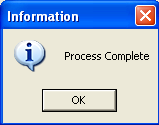
Press the button to update the table from the matrix. A process complete information box will be displayed when the table has been updated such as the one shown below:
Click OK