 The preview button, when pressed, provides an on-screen report based on the selections entered in the program.
 At the top of the program view one or more of the following functions may be available:
The preview button, when pressed, provides an on-screen report based on the selections entered in the program.
From within the preview screen, these additional functions may be selected:
Open  This icon will let you open another vpe document.
Save  This icon will let you save the previewed document to as a file.
Print  This icon opens a print dialog box where you may select a printer and print the document.
Email  This icon will open an untitled message box with the document inserted as a .pdf.
Pages  These two icons will make the document a full page or will fit the document to the screen.
Navigation Arrows  These icons will access the first, next, previous and last page(s) of the document.
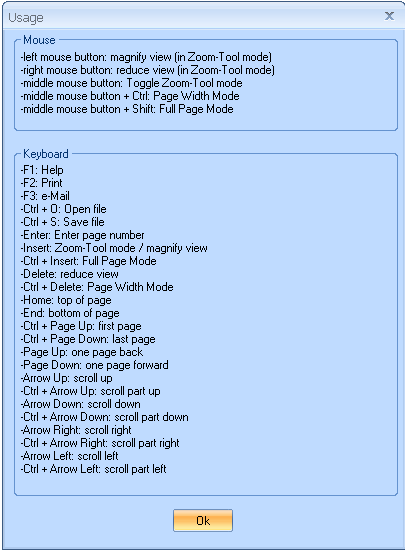
Help  This icon opens an information box on shortcut keystroke information as shown below:
Close Preview  Click this icon to close the preview
***********************************
***********************************
 The print button, when pressed, will send the generated report to a previously set printer. If a printer has not been setup, the Print Setup dialog box will be brought up. Select a printer and press the print button
 The print with setup button, when pressed, will bring up a print dialog box. Select a printer and press print.
 The email button, when pressed, will generate the report in .pdf format as an attachment in an Untitled Message box.
 Click the down arrow at the bottom of the export button and select one of the available formats. Select the appropriate local or network folder and press the save button.
 Clear selections will clear entered or selected information from all fields, returning the program to its default state.
The Clear Selections icon has not been activated for all programs.
The Help on Report button will open the information for the report in the help file. Reports with the Help on Report button include logic information on how the report is generated.

Will open a browse box when activated while in a field that has browse capabilities.

Will remove the entered information from the active field when activated.

Will remove all of the entered information.

Will close the program view.