
Revised: 10/02/2013
Go to Reports>>Batch Letters and Forms
This program is used to print a selected letter or form for the tenants displayed and checked in the grid. The Tenant Summary Application may also be printed for tenant's selected in the grid using this program and the Print Summary button at the bottom right of the view.
Select a Letter Code for a letter or form that is to be printed. Merge letters or forms are setup in Merge Template.
The Description for the selected letter code will be displayed.
There are many ways for information to be generated for the grid. Selecting an Area or Area and Community combination is one way.
Enter or select an Area Number or leave this field blank to use the Community Number or other selection process.
Enter or select a Community Number or leave this field blank to use another selection process.
With an area and community selected a range of unit numbers may be entered or the unit fields may remain blank to have the ability to select from all the units within an area or area and community.
Enter or select the First Unit number for the range or leave this field blank for all units or another selection process.
Enter or select the a Last Unit number to end the range or leave this field blank for all units or another selection process.
Select one of the following date options to work with the entered date range to generate entries in the grid in combination with the general selections made:
Next Reexamination
Last Reexamination
Effective Date
Move-In Date
Appointment Date
Unit Inspection Date
Enter a starting date to begin a date range for selecting information based on the selection type for the gird. This field may be left blank for other reporting options.
Enter an ending date to end the date range for selecting information based on the selection type for the grid. This field may be left blank for other reporting options.
Press the Build From Selections button to use the selections entered to populate the grid. Other options may be used to build selection information in the grid.
Press the Build From Last Report button to build information in the grid from the last report ran in the Tenant Management program.
When this button is used the other selections available on this view may not have any influence on the information that is pulled for the gird.
When one of the build buttons has been activated, the grid will display tenant information based upon the selections entered or a report.
Unit/Tenant information shown in the grid may be selected/unselected by placing a checkmark or removing the checkmark in the X column. When a line of information is checked the selected letter or form will be printed for it when the Print Batch button is pressed.
The grid information includes the following:
X (this is the selection column to be checked or unchecked)
Area
Community
Unit
Tenant
Last Name
First Name
Click the select all button to place a checkmark in the X column for all lines.
Click the unselect all to remove all checkmarks in the X column for all lines.
The current date will be displayed in this field and may be changed. The letter date field is a merge variable global option which may have been used in the Letter Code selected.
Click this button to bring up the print options dialog box shown below:
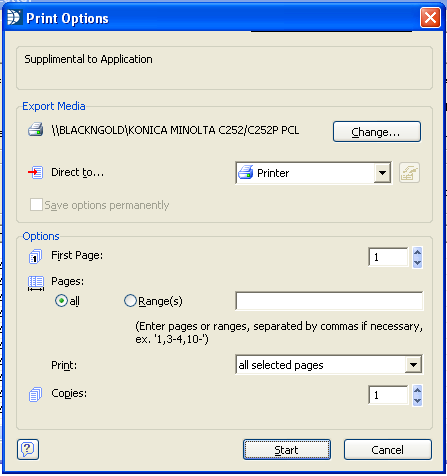
Export media shows the printer that will print out the letters. Click the Change... button to select a different printer.
Defaults to Printer but the preview option may be selected to view the letters prior to printing or you can leave the selection at Printer and click the start button to start printing the letters.
Click the start button to preview or print the letters.
Click the cancel button to close the print options dialog box without printing.
*******************
The Close button may be clicked at any time to close the program.
Press the Print Summary button to bring up the Tenant Summary Application program. The Tenant Summary may be previewed and/or printed for the tenants selected in the grid.