Revised: 06/18/2014
Go to Right Sidebar>>Outstanding Work Orders
This program will generate a listing of outstanding work orders.
Click on the Outstanding Work Orders program on the right side bar of the Maintenance Management program to open the view. The view can be "pinned" into the open position by clicking on the "stick pin"  . When the program has been pinned open the pin will be rotated into an upright position
  . To release the program click the "stick pin" again.
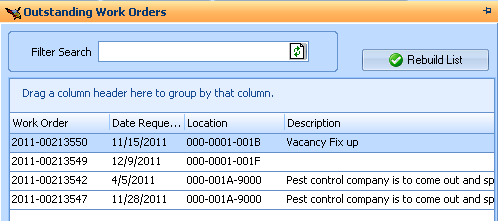
Search information can be entered into the Filter Search field and the search button clicked to search for work orders that contain the information. Search information may be a work order number, date, location, or description.
The Filter Search field may also be left blank and the Rebuild List button used to populate the grid with all outstanding work orders. Search information may be removed and the Rebuild List button will populate the grid with all outstanding work orders.
Click the Rebuild List button to populate the grid with outstanding work orders.
The grid will contain the following information:
Work Order
Date Requested
Location
Last Name
Description
The order in which the columns are displayed may be changed by clicking and dragging a column header into a new position.
Outstanding Work Orders that are shown in the grid may be double clicked to open them in Work Order Entry.